> ## Documentation Index
> Fetch the complete documentation index at: https://docs.civic.com/llms.txt
> Use this file to discover all available pages before exploring further.

# Civic Auth

> Civic Auth is a simple, flexible, and fast way to integrate authentication into your applications. Enable familiar sign-in options while offering optional embedded wallets and unlocking blockchain benefits for your users.

## What is Civic Auth?

<Info>
  Civic Auth is currently in **beta**. Please expect occasional changes or updates as we continue to refine the experience.
</Info>

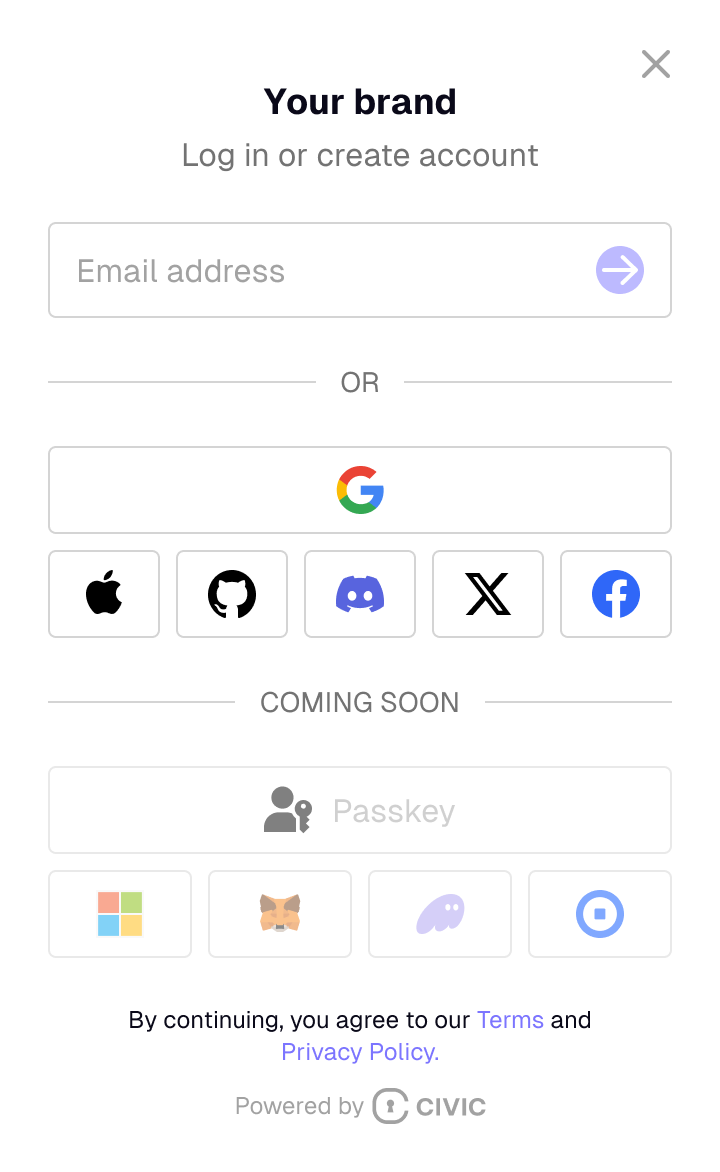
<Frame caption="Civic Auth: User-Facing View">
  <img src="https://mintcdn.com/civic/FNU9tgZLQ0eorSeU/login.png?fit=max&auto=format&n=FNU9tgZLQ0eorSeU&q=85&s=bafeba995f42bba0dfe74b375ace0848" align="center" className="image-60 image-rounded" alt="" title="" width="720" height="1172" data-path="login.png" />
</Frame>

<CardGroup cols={2}>
  <Card title="Integrated login." icon="user">
    Users sign in using their email, Google account, or wallet. No complex setup required.
  </Card>

  <Card title="Adaptable onboarding." icon="user-plus">
    Auth is a familiar sign-in experience for all users. Supports existing wallets or integrated embedded wallets.
  </Card>

  <Card title="Embedded wallets." icon="wallet">
    Automatically create [Web3 wallets](/web3/embedded-wallets) for your users.
  </Card>

  <Card title="Multichain support." icon="gear">
    Supported on Solana, as well as Base, Binance Smart Chain (BSC), Polygon, Arbitrum, Ethereum, and other EVM-compatible chains.
  </Card>
</CardGroup>

## Quick Start

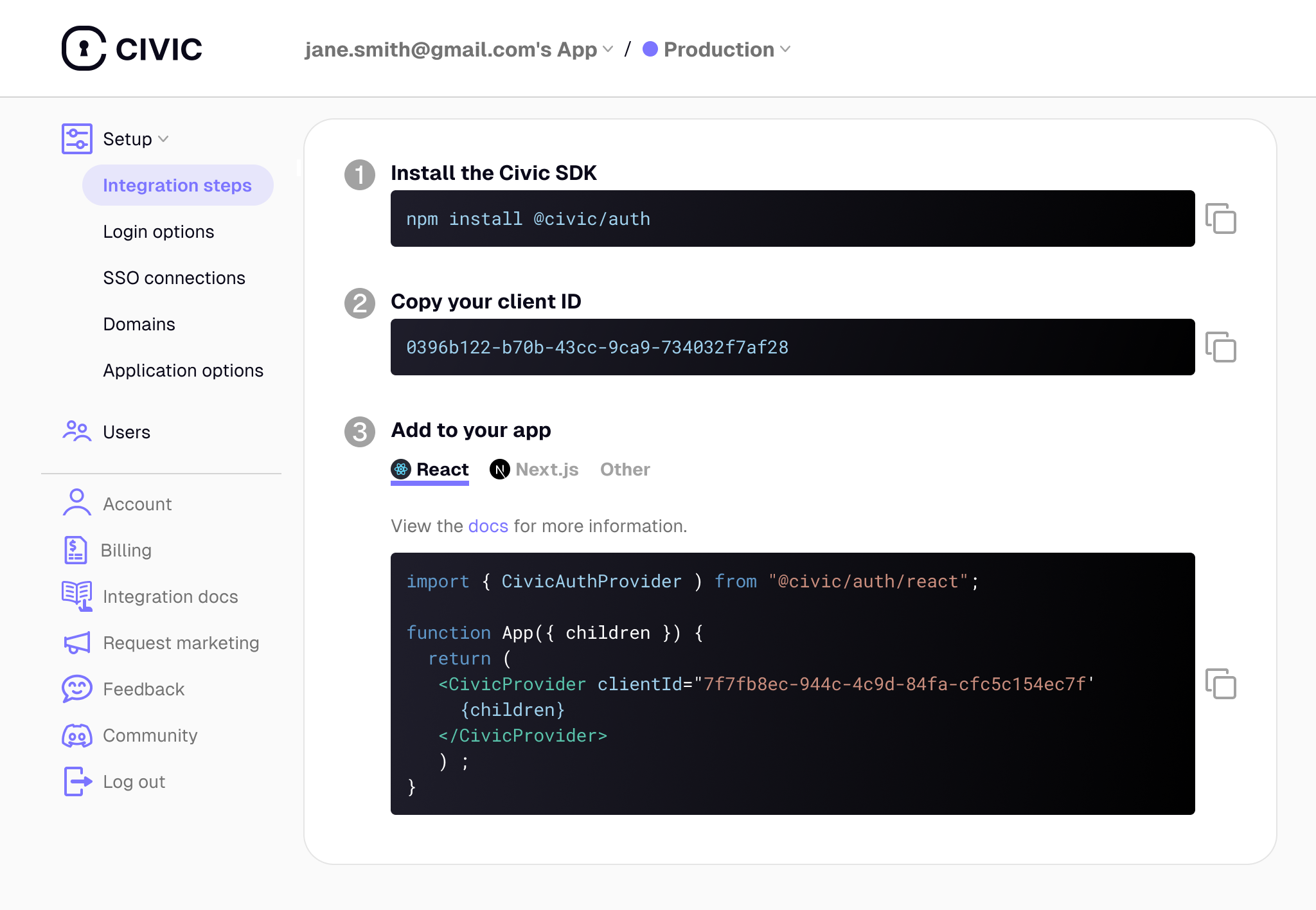
Sign up for Civic Auth in less than a minute at [auth.civic.com](https://auth.civic.com) to get your Client ID.

<Frame caption="Civic Auth: Admin Dashboard - Integration Steps">
  <img src="https://mintcdn.com/civic/O4L8MDyrwt6gcvaS/images/image-2.png?fit=max&auto=format&n=O4L8MDyrwt6gcvaS&q=85&s=4eefd4ef0e257dbc4f71426a62268fd1" alt="" width="2048" height="1416" data-path="images/image-2.png" />
</Frame>

Install the library in your app.

<CodeGroup>
  ```npm npm theme={null}
  npm install @civic/auth
  ```

  ```yarn yarn theme={null}
  yarn add @civic/auth
  ```

  ```pnpm pnpm theme={null}
  pnpm install @civic/auth
  ```

  ```bun bun theme={null}
  bun add @civic/auth
  ```

  ```python pip theme={null}
  pip install civic-auth
  ```

  ```python uv theme={null}
  uv add civic-auth
  ```
</CodeGroup>

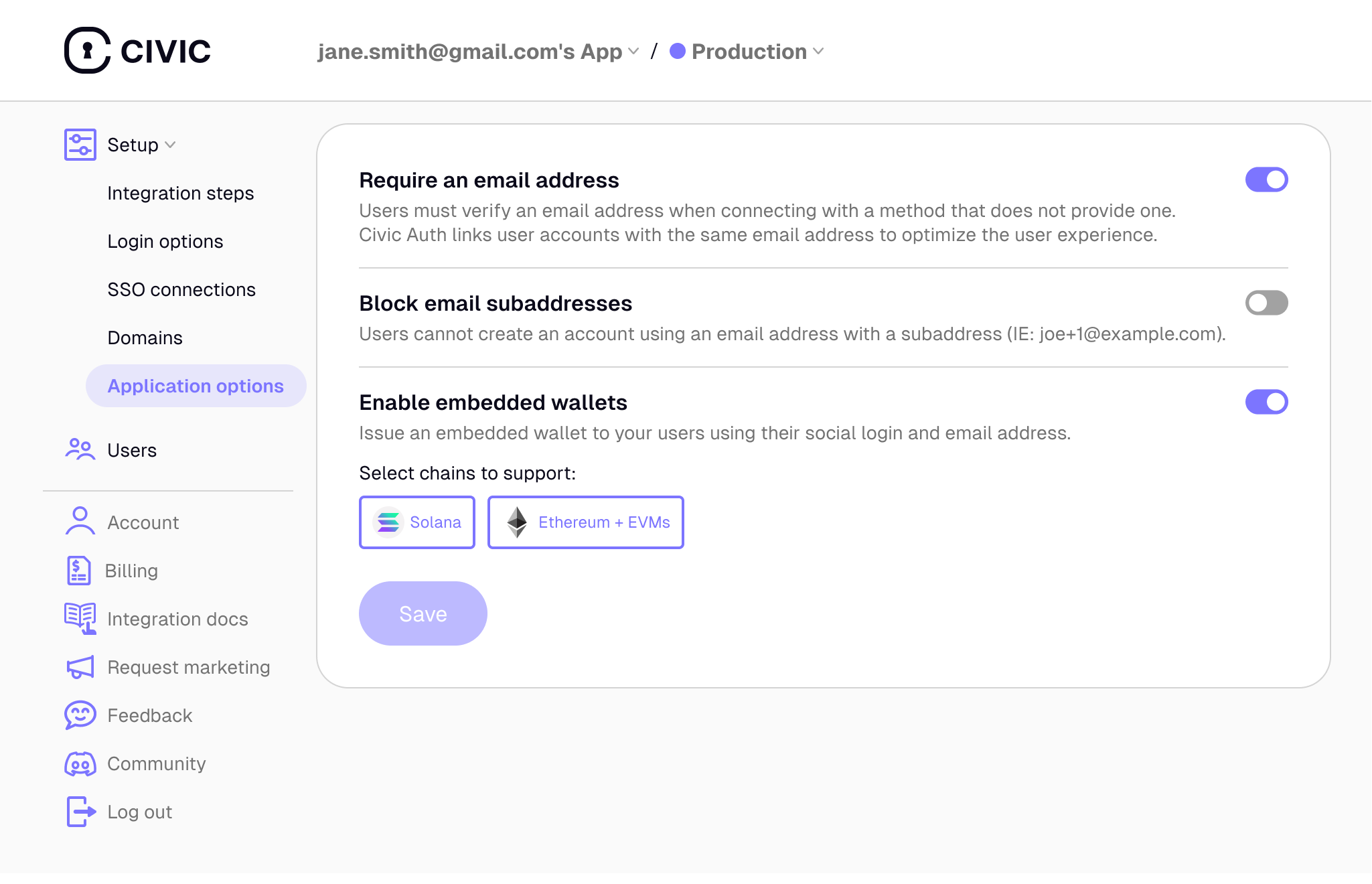
## Web3 Wallets

If you plan to offer your users [Web3 wallets](/auth/index#web3-wallets), you can use the Civic Auth Web3 SDK.

<Frame caption="Civic Auth: Admin Dashboard - Web3 Wallets Support">
  <img src="https://mintcdn.com/civic/O4L8MDyrwt6gcvaS/images/image-3.png?fit=max&auto=format&n=O4L8MDyrwt6gcvaS&q=85&s=e418537a5137904174223243a6a1b04d" alt="" width="2049" height="1320" data-path="images/image-3.png" />
</Frame>

This SDK extends the functionality of the base Civic Auth SDK to add Web3 features.

<CodeGroup>
  ```npm-1 npm theme={null}
  npm install @civic/auth-web3
  ```

  ```yarn-1 yarn theme={null}
  yarn add @civic/auth-web3
  ```

  ```pnpm-1 pnpm theme={null}
  pnpm install @civic/auth-web3
  ```

  ```bun-1 bun theme={null}
  bun add @civic/auth-web3
  ```
</CodeGroup>

### Usage

Choose your framework for instructions on how to integrate Civic Auth into your application.

<CardGroup cols={3}>
  <Card href="/integration/react" img="https://mintcdn.com/civic/O4L8MDyrwt6gcvaS/images/image-4.png?fit=max&auto=format&n=O4L8MDyrwt6gcvaS&q=85&s=543f494c1143b6e9375bcdf732cc1aa8" width="735" height="413" data-path="images/image-4.png">
    React
  </Card>

  <Card href="/integration/nextjs" img="https://mintcdn.com/civic/O4L8MDyrwt6gcvaS/images/image-5.jpeg?fit=max&auto=format&n=O4L8MDyrwt6gcvaS&q=85&s=8d115a24156b10f2010b0e9e7e012a74" width="1877" height="1057" data-path="images/image-5.jpeg">
    Next.JS
  </Card>

  <Card href="/integration/vanillajs" img="https://mintcdn.com/civic/O4L8MDyrwt6gcvaS/images/image-8.png?fit=max&auto=format&n=O4L8MDyrwt6gcvaS&q=85&s=e3980403f23aa9921dd5d962398ec99d" width="948" height="533" data-path="images/image-8.png">
    Vanilla JavaScript
  </Card>

  <Card href="/integration/nodejs" img="https://mintcdn.com/civic/O4L8MDyrwt6gcvaS/images/image-6.png?fit=max&auto=format&n=O4L8MDyrwt6gcvaS&q=85&s=bff790c56ef07cf3b4af9b549ddee15f" width="735" height="413" data-path="images/image-6.png">
    Node.JS
  </Card>

  <Card href="/integration/python" img="https://mintcdn.com/civic/O4L8MDyrwt6gcvaS/images/image-7.png?fit=max&auto=format&n=O4L8MDyrwt6gcvaS&q=85&s=6866213a8cd817e739bf160ae9a89496" width="735" height="413" data-path="images/image-7.png">
    Python
  </Card>

  <Card href="/integration/mobile/react-native" img="https://mintcdn.com/civic/O4L8MDyrwt6gcvaS/images/image-4.png?fit=max&auto=format&n=O4L8MDyrwt6gcvaS&q=85&s=543f494c1143b6e9375bcdf732cc1aa8" width="735" height="413" data-path="images/image-4.png">
    React Native
  </Card>
</CardGroup>

For integrating in other environments using any OIDC or OAuth 2.0-compliant client libraries, see [here](/integration/other).

### Civic Auth Demo

Don't take our word for it. See Civic Auth in action:
<Frame>
  <iframe width="100%" height="420" src="https://www.youtube.com/embed/0VqK56JqIL0" title="Demo - Civic Auth for seamless user management" frameborder="0" allow="accelerometer; autoplay; clipboard-write; encrypted-media; gyroscope; picture-in-picture; web-share" referrerpolicy="strict-origin-when-cross-origin" allowfullscreen />
</Frame>