> ## Documentation Index
> Fetch the complete documentation index at: https://docs.civic.com/llms.txt
> Use this file to discover all available pages before exploring further.
# Managing Authorizations
> Understand and control access to your connected services and data
## What are Authorizations?
An authorization is the permission you give Civic to access your tools and services on your behalf. When you connect a service like GitHub, Slack, or Notion to Civic, you're creating an authorization that allows your AI assistants to interact with that service using your account.
**You're always in control** - Once you've given access to your tools, you can always revoke them instantly. Authorizations are not permanent and can be managed at any time.
## How Authorizations Work
When you first connect a service to Civic:
1. **You grant permission** - You authorize Civic to access specific data from the service
2. **Secure token storage** - Civic securely stores your access tokens with encryption
3. **AI assistant access** - Your AI can now use that service through MCP tools
4. **Ongoing control** - You maintain full control to revoke access anytime
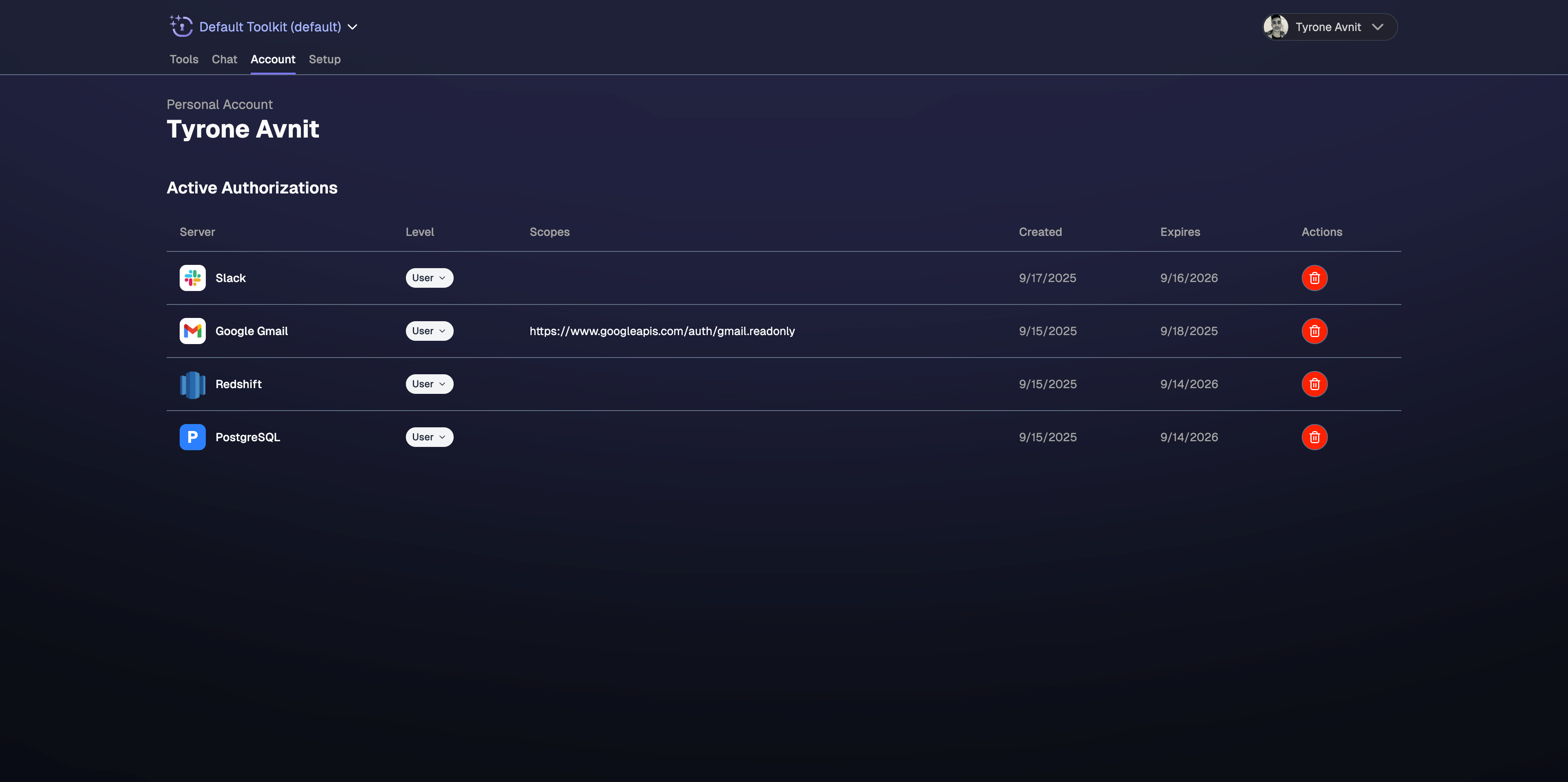 ## Credential Visibility
Every credential has a **visibility** level that determines who can see and use it:
| Visibility | Who can use it | UI label |
| ---------------- | ----------------------------------------------- | -------------- |
| **User** | Only the owning user, within the owning account | "User" |
| **Organization** | Any user in the account | "Organization" |
* A **User** credential belongs to one person in one account. Even if a user belongs to multiple accounts, the credential is scoped to the account where it was created.
* An **Organization** credential is shared across all users in the account. Only admins and owners can promote a credential to Organization visibility.
## Profile Assignment
Credentials can be **assigned** to one or more profiles (toolkits). How assignment affects credential discovery depends on whether the profile is locked or unlocked:
* **Unlocked profiles** discover all credentials in the account that match the required provider and scopes, regardless of whether they are assigned. Assignment is optional and has no effect on discovery.
* **Locked profiles** (e.g. when using a profile-scoped token) discover **only** credentials that have been explicitly assigned to the profile. Unassigned credentials are invisible to locked profiles.
Assignment is independent of visibility — a User credential can be assigned to multiple profiles (but only the owning user can use it), and an Organization credential can be assigned to specific profiles.
## Locked Profiles Restrict Credential Access
When a profile is [locked](/civic/quickstart/clients/agents#profile-locking) — for example, when using a profile-scoped token — only credentials explicitly **assigned** to the profile are discovered. Unassigned credentials are not resolved, even if they would otherwise match.
If an unassigned credential exists that would have matched, the system returns a **"promotion required"** message instead of prompting for fresh authentication:
> "A matching credential exists but is not assigned to this profile. An account admin can assign it through the authorization management UI."
No auth URL is provided in this case. The user or an account admin must assign the existing credential to the profile through the web UI.
**Rollout note:** If you are using profile-scoped tokens (e.g. via token exchange with a `civic_profile` claim), credentials that were previously resolved automatically may now require explicit assignment. Review your credential assignments in the authorizations dashboard to ensure your profiles have the credentials they need.
## Managing Your Authorizations
### Full Control Over Access
* ✅ **View all connections** - See every service you've authorized
* ✅ **Instant revocation** - Remove access to any service immediately
* ✅ **Immediate effect** - Changes apply across all your AI assistants instantly
### When to Revoke Access
You might want to revoke authorizations when:
* **No longer using a service** - Clean up unused connections
* **Security concerns** - Remove access if you suspect any issues
* **Account changes** - When switching accounts or roles
* **Testing purposes** - Temporarily disable specific integrations
* **Privacy preferences** - Limit AI assistant access to certain data
## How to Revoke Authorizations
Go to [app.civic.com](https://app.civic.com/web/authorizations) and sign in to your account
Navigate to your account settings or connected services section
Find the service you want to disconnect and click the revoke or disconnect option
Confirm that you want to remove access to this service
**Immediate Effect**: When you revoke access to a service, it will immediately stop working across all your AI assistants. Any ongoing conversations or tasks using that service will be interrupted.
## Authorization Scope and Permissions
### What You Authorize
When you connect a service, you typically grant access to:
* **Read your data** - View files, messages, repositories, etc.
* **Create content** - Add new items, send messages, create files
* **Update existing items** - Edit documents, update records, modify settings
* **Delete items** - Remove content when explicitly requested
### What You DON'T Authorize
Civic and your AI assistants cannot:
* **Access other accounts** - Only your explicitly connected accounts
* **Exceed your permissions** - AI has the same limits as your user account
* **Access unrelated services** - Only services you've specifically connected
* **Persist beyond revocation** - Access stops immediately when revoked
### What admins can do
| Action | User credential (own) | Organization credential | Requirement |
| ------------------ | --------------------- | ----------------------- | -------------------------------------- |
| View | Yes | Yes | Member+ |
| Revoke (delete) | Yes | Yes | Admin/Owner for Organization |
| Change visibility | Yes | — | Admin/Owner to promote to Organization |
| Assign to profiles | Yes | Yes | Admin/Owner |
## Security and Privacy
### Protected Information
Your authorization data is protected through:
* 🔒 **Encrypted storage** - All tokens encrypted at rest
* 🔐 **Secure transmission** - TLS encryption for all communications
* 🛡️ **Access controls** - Only you can view or modify your authorizations
* ⏰ **Automatic refresh** - Tokens refreshed securely without your intervention
### Minimal Permissions
When you connect a service to Civic, we only ask for the specific permissions we actually need. We request the minimum access required for AI assistants to work with your tools, and nothing more.
This approach helps protect your data by ensuring Civic never requests unnecessary permissions to access or modify your accounts.
## Best Practices
**Monthly review recommended:**
* Check which services are still connected
* Remove authorizations for unused services
* Verify all connections are still needed
* Clean up old or forgotten integrations
**Only connect what you need:**
* Start with essential services only
* Add more connections as needed
* Remove authorizations when projects end
* Keep your authorization list minimal and relevant
**Protect your authorizations:**
* Use strong passwords for connected accounts
* Enable 2FA on all connected services
* Monitor for unusual activity
* Revoke access immediately if concerned
## Troubleshooting Authorization Issues
**Problem:** Can't authorize a new service
**Solutions:**
* Ensure you're signed into the correct account for the service
* Check if the service is temporarily unavailable
* Clear browser cookies and try again
* Join our developer community if the issue persists
**Problem:** Connected service isn't responding to AI requests
**Solutions:**
* Wait a few minutes for authorization to propagate
* Try disconnecting and reconnecting the service
* Check if your account permissions changed
* Verify the service is online and accessible
**Problem:** Unable to disconnect a service
**Solutions:**
* Refresh the page and try again
* Clear browser cache and cookies
* Try from a different browser or device
* Join our developer community for assistance
## Need Help?
Having trouble with authorizations? Join our developer community for assistance with connecting or disconnecting services.
## Credential Visibility
Every credential has a **visibility** level that determines who can see and use it:
| Visibility | Who can use it | UI label |
| ---------------- | ----------------------------------------------- | -------------- |
| **User** | Only the owning user, within the owning account | "User" |
| **Organization** | Any user in the account | "Organization" |
* A **User** credential belongs to one person in one account. Even if a user belongs to multiple accounts, the credential is scoped to the account where it was created.
* An **Organization** credential is shared across all users in the account. Only admins and owners can promote a credential to Organization visibility.
## Profile Assignment
Credentials can be **assigned** to one or more profiles (toolkits). How assignment affects credential discovery depends on whether the profile is locked or unlocked:
* **Unlocked profiles** discover all credentials in the account that match the required provider and scopes, regardless of whether they are assigned. Assignment is optional and has no effect on discovery.
* **Locked profiles** (e.g. when using a profile-scoped token) discover **only** credentials that have been explicitly assigned to the profile. Unassigned credentials are invisible to locked profiles.
Assignment is independent of visibility — a User credential can be assigned to multiple profiles (but only the owning user can use it), and an Organization credential can be assigned to specific profiles.
## Locked Profiles Restrict Credential Access
When a profile is [locked](/civic/quickstart/clients/agents#profile-locking) — for example, when using a profile-scoped token — only credentials explicitly **assigned** to the profile are discovered. Unassigned credentials are not resolved, even if they would otherwise match.
If an unassigned credential exists that would have matched, the system returns a **"promotion required"** message instead of prompting for fresh authentication:
> "A matching credential exists but is not assigned to this profile. An account admin can assign it through the authorization management UI."
No auth URL is provided in this case. The user or an account admin must assign the existing credential to the profile through the web UI.
**Rollout note:** If you are using profile-scoped tokens (e.g. via token exchange with a `civic_profile` claim), credentials that were previously resolved automatically may now require explicit assignment. Review your credential assignments in the authorizations dashboard to ensure your profiles have the credentials they need.
## Managing Your Authorizations
### Full Control Over Access
* ✅ **View all connections** - See every service you've authorized
* ✅ **Instant revocation** - Remove access to any service immediately
* ✅ **Immediate effect** - Changes apply across all your AI assistants instantly
### When to Revoke Access
You might want to revoke authorizations when:
* **No longer using a service** - Clean up unused connections
* **Security concerns** - Remove access if you suspect any issues
* **Account changes** - When switching accounts or roles
* **Testing purposes** - Temporarily disable specific integrations
* **Privacy preferences** - Limit AI assistant access to certain data
## How to Revoke Authorizations
Go to [app.civic.com](https://app.civic.com/web/authorizations) and sign in to your account
Navigate to your account settings or connected services section
Find the service you want to disconnect and click the revoke or disconnect option
Confirm that you want to remove access to this service
**Immediate Effect**: When you revoke access to a service, it will immediately stop working across all your AI assistants. Any ongoing conversations or tasks using that service will be interrupted.
## Authorization Scope and Permissions
### What You Authorize
When you connect a service, you typically grant access to:
* **Read your data** - View files, messages, repositories, etc.
* **Create content** - Add new items, send messages, create files
* **Update existing items** - Edit documents, update records, modify settings
* **Delete items** - Remove content when explicitly requested
### What You DON'T Authorize
Civic and your AI assistants cannot:
* **Access other accounts** - Only your explicitly connected accounts
* **Exceed your permissions** - AI has the same limits as your user account
* **Access unrelated services** - Only services you've specifically connected
* **Persist beyond revocation** - Access stops immediately when revoked
### What admins can do
| Action | User credential (own) | Organization credential | Requirement |
| ------------------ | --------------------- | ----------------------- | -------------------------------------- |
| View | Yes | Yes | Member+ |
| Revoke (delete) | Yes | Yes | Admin/Owner for Organization |
| Change visibility | Yes | — | Admin/Owner to promote to Organization |
| Assign to profiles | Yes | Yes | Admin/Owner |
## Security and Privacy
### Protected Information
Your authorization data is protected through:
* 🔒 **Encrypted storage** - All tokens encrypted at rest
* 🔐 **Secure transmission** - TLS encryption for all communications
* 🛡️ **Access controls** - Only you can view or modify your authorizations
* ⏰ **Automatic refresh** - Tokens refreshed securely without your intervention
### Minimal Permissions
When you connect a service to Civic, we only ask for the specific permissions we actually need. We request the minimum access required for AI assistants to work with your tools, and nothing more.
This approach helps protect your data by ensuring Civic never requests unnecessary permissions to access or modify your accounts.
## Best Practices
**Monthly review recommended:**
* Check which services are still connected
* Remove authorizations for unused services
* Verify all connections are still needed
* Clean up old or forgotten integrations
**Only connect what you need:**
* Start with essential services only
* Add more connections as needed
* Remove authorizations when projects end
* Keep your authorization list minimal and relevant
**Protect your authorizations:**
* Use strong passwords for connected accounts
* Enable 2FA on all connected services
* Monitor for unusual activity
* Revoke access immediately if concerned
## Troubleshooting Authorization Issues
**Problem:** Can't authorize a new service
**Solutions:**
* Ensure you're signed into the correct account for the service
* Check if the service is temporarily unavailable
* Clear browser cookies and try again
* Join our developer community if the issue persists
**Problem:** Connected service isn't responding to AI requests
**Solutions:**
* Wait a few minutes for authorization to propagate
* Try disconnecting and reconnecting the service
* Check if your account permissions changed
* Verify the service is online and accessible
**Problem:** Unable to disconnect a service
**Solutions:**
* Refresh the page and try again
* Clear browser cache and cookies
* Try from a different browser or device
* Join our developer community for assistance
## Need Help?
Having trouble with authorizations? Join our developer community for assistance with connecting or disconnecting services.