> ## Documentation Index
> Fetch the complete documentation index at: https://docs.civic.com/llms.txt
> Use this file to discover all available pages before exploring further.
# Authentication Flows
> Understanding Civic Auth's flexible OAuth 2.0 authentication methods for maximum security across all application types.
Civic Auth supports multiple OAuth 2.0 authentication methods to provide maximum security across different application architectures and use cases.
## Authentication Methods
**Best for:** Public clients (SPAs, mobile apps) where secrets cannot be securely stored.
### How it Works
* Uses Proof Key for Code Exchange (PKCE) for security
* Default method for public clients
* Code verifier/challenge mechanism provides security
* No client secret required or used
### Security Benefits
* ✅ No sensitive credentials to manage client-side
* ✅ Dynamic verification for each authentication request
* ✅ Industry standard for public clients
* ✅ Prevents authorization code interception attacks
### Configuration
```javascript theme={null}
const config = {
clientId: "your_client_id",
// PKCE enabled by default, no client secret needed
redirectUrl: "https://yourapp.com/callback"
}
```
**Best for:** Server-side applications that do not support PKCE.
### How it Works
* Uses traditional OAuth 2.0 authorization code flow
* Client authenticates using client secret
* PKCE disabled for compatibility with legacy systems
* Suitable for confidential clients with secure storage
### Security Benefits
* ✅ Familiar OAuth 2.0 authentication pattern
* ✅ Client authentication via shared secret
* ✅ Compatible with existing OAuth infrastructure
* ✅ Server-side credential protection
### Configuration
```javascript theme={null}
const config = {
clientId: "your_client_id",
clientSecret: "your_client_secret", // Generate in dashboard Security tab
pkce: false, // Disable PKCE for traditional OAuth flow
redirectUrl: "https://yourapp.com/callback"
}
```
**Best for:** Maximum security for confidential clients that can support both methods.
### How it Works
* Combines PKCE with client secret authentication
* Provides maximum security through dual verification
* Suitable for high-security server-side applications
* Both PKCE challenge and client secret verified
### Security Benefits
* ✅ **Maximum security** through dual authentication
* ✅ Protection against authorization code interception
* ✅ Client authentication via secret
* ✅ Dynamic PKCE verification per request
### Configuration
```javascript theme={null}
const config = {
clientId: "your_client_id",
clientSecret: "your_client_secret", // Generate in dashboard Security tab
pkce: true, // Enable PKCE alongside client secret
redirectUrl: "https://yourapp.com/callback"
}
```
## When to Use Each Method
* Single-page applications (SPAs)
* Mobile applications
* Frontend applications (React, Vue, Angular)
* When client secrets cannot be securely stored
* Default for public clients
* Legacy OAuth 2.0 integrations
* Traditional server-side applications
* When PKCE is not supported
* Simple backend services
* Existing OAuth infrastructure
* **High-security server applications**
* Financial or healthcare systems
* Enterprise backend services
* **Maximum security requirements**
* Modern confidential clients
## Getting Client Secrets
To generate a client secret, log into your dashboard at [auth.civic.com](https://auth.civic.com), navigate to the Security tab, and click "Generate Client Secret". **Important:** The client secret is only displayed once upon generation, so make sure to copy and securely store it immediately. You can always regenerate a new client secret if needed.
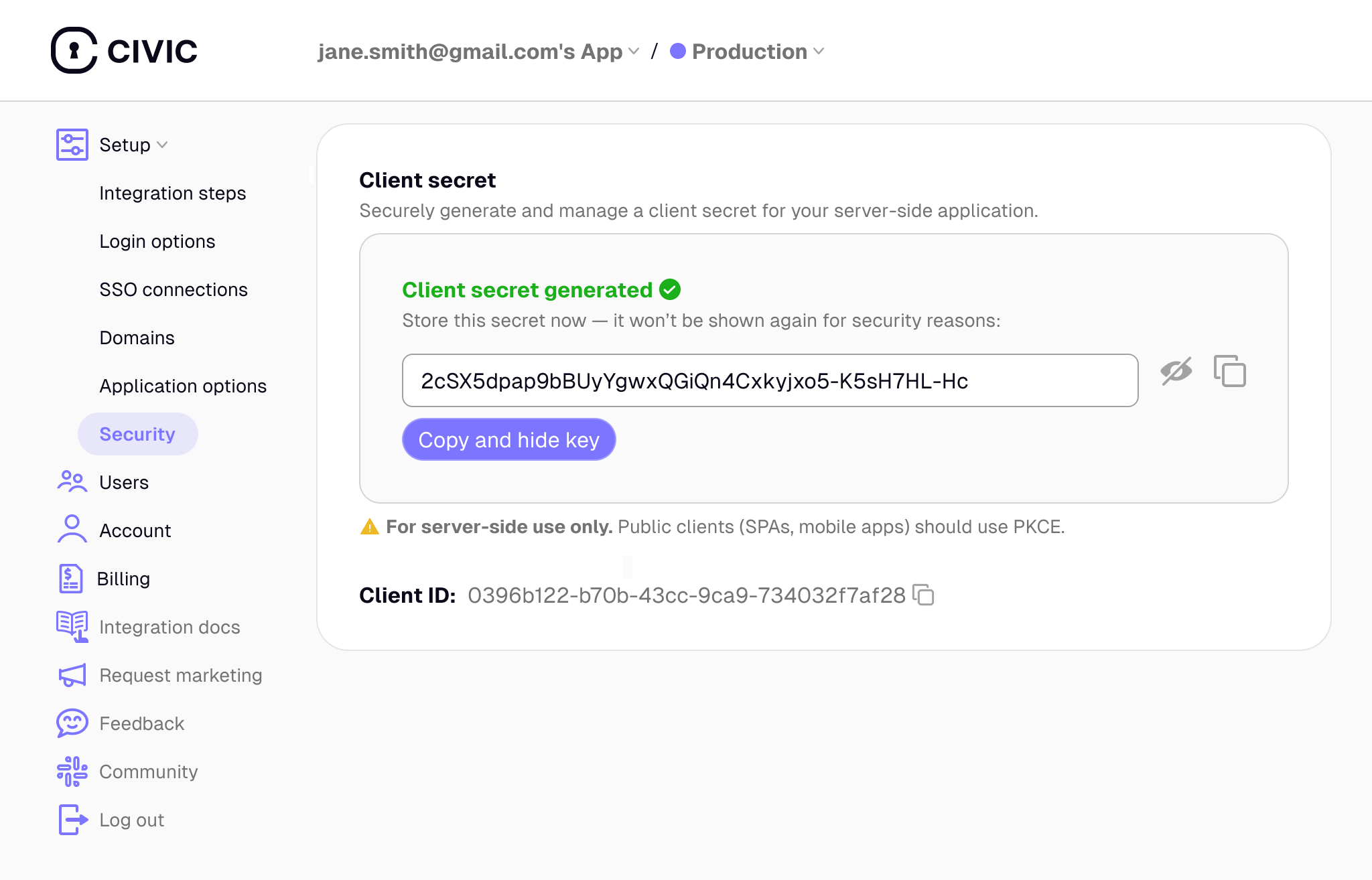 **Security Requirements**: Client secrets must be stored securely and never exposed in client-side code. They are suitable only for server-side applications with secure credential storage.
**Flexible Security**: Choose the authentication method that best fits your application architecture. Use PKCE-only for public clients, client secrets for traditional OAuth compatibility, or both together for maximum security.
## Security Considerations
* **No secrets to compromise:** Even if your frontend code is inspected, there are no sensitive credentials
* **Dynamic verification:** Each authentication request uses a unique code verifier/challenge pair
* **Domain validation:** Production apps require domain registration for additional security
* **Industry standard:** Recommended by OAuth 2.0 Security Best Practices
* **Secure storage required:** Client secrets must be stored securely and never exposed to client-side code
* **Server-side only:** Authentication logic must run on your backend servers
* **Environment variables:** Use environment variables or secure secret management systems
* **HTTPS required:** Always use HTTPS in production to protect credentials in transit
## Implementation Example
The Civic Auth SDK is initialized with a `config` object that varies based on the authentication method you choose. The core implementation remains the same.
```javascript theme={null}
import { CivicAuth } from '@civic/auth/server';
// Define the config object using the parameters from the table below
const config = {
clientId: process.env.CLIENT_ID,
// ... other parameters
};
// 'storage' is your implementation of CookieStorage
const civicAuth = new CivicAuth(storage, config);
```
### Configuration Parameters
| Parameter | PKCE Only (Default) | Client Secret Only | PKCE + Client Secret (Max Security) | Notes |
| :---------------------- | :------------------ | :----------------- | :---------------------------------- | :----------------------------------- |
| `clientId` | Required | Required | Required | Your application's Client ID. |
| `clientSecret` | Not used | Required | Required | Generate in dashboard Security tab. |
| `pkce` | `true` (default) | `false` | `true` | Enables or disables PKCE. |
| `redirectUrl` | Required | Required | Required | The URL to redirect to after login. |
| `postLogoutRedirectUrl` | Optional | Optional | Optional | The URL to redirect to after logout. |
For full implementation examples with specific frameworks, see our [integration guides](/integration). The guides show the PKCE-only approach by default, but you can adapt the `config` object using the parameters above for other flows.
**Security Requirements**: Client secrets must be stored securely and never exposed in client-side code. They are suitable only for server-side applications with secure credential storage.
**Flexible Security**: Choose the authentication method that best fits your application architecture. Use PKCE-only for public clients, client secrets for traditional OAuth compatibility, or both together for maximum security.
## Security Considerations
* **No secrets to compromise:** Even if your frontend code is inspected, there are no sensitive credentials
* **Dynamic verification:** Each authentication request uses a unique code verifier/challenge pair
* **Domain validation:** Production apps require domain registration for additional security
* **Industry standard:** Recommended by OAuth 2.0 Security Best Practices
* **Secure storage required:** Client secrets must be stored securely and never exposed to client-side code
* **Server-side only:** Authentication logic must run on your backend servers
* **Environment variables:** Use environment variables or secure secret management systems
* **HTTPS required:** Always use HTTPS in production to protect credentials in transit
## Implementation Example
The Civic Auth SDK is initialized with a `config` object that varies based on the authentication method you choose. The core implementation remains the same.
```javascript theme={null}
import { CivicAuth } from '@civic/auth/server';
// Define the config object using the parameters from the table below
const config = {
clientId: process.env.CLIENT_ID,
// ... other parameters
};
// 'storage' is your implementation of CookieStorage
const civicAuth = new CivicAuth(storage, config);
```
### Configuration Parameters
| Parameter | PKCE Only (Default) | Client Secret Only | PKCE + Client Secret (Max Security) | Notes |
| :---------------------- | :------------------ | :----------------- | :---------------------------------- | :----------------------------------- |
| `clientId` | Required | Required | Required | Your application's Client ID. |
| `clientSecret` | Not used | Required | Required | Generate in dashboard Security tab. |
| `pkce` | `true` (default) | `false` | `true` | Enables or disables PKCE. |
| `redirectUrl` | Required | Required | Required | The URL to redirect to after login. |
| `postLogoutRedirectUrl` | Optional | Optional | Optional | The URL to redirect to after logout. |
For full implementation examples with specific frameworks, see our [integration guides](/integration). The guides show the PKCE-only approach by default, but you can adapt the `config` object using the parameters above for other flows.