> ## Documentation Index
> Fetch the complete documentation index at: https://docs.civic.com/llms.txt
> Use this file to discover all available pages before exploring further.
# Passkeys
> Complete guide to implementing and using passkeys with Civic Auth for passwordless authentication.
Passkeys offer a secure and passwordless replacement for traditional passwords. They provide enhanced security while delivering a seamless user experience through biometric authentication, device PINs, or security keys.
## How to Enable Passkeys
To enable passkeys for your app:
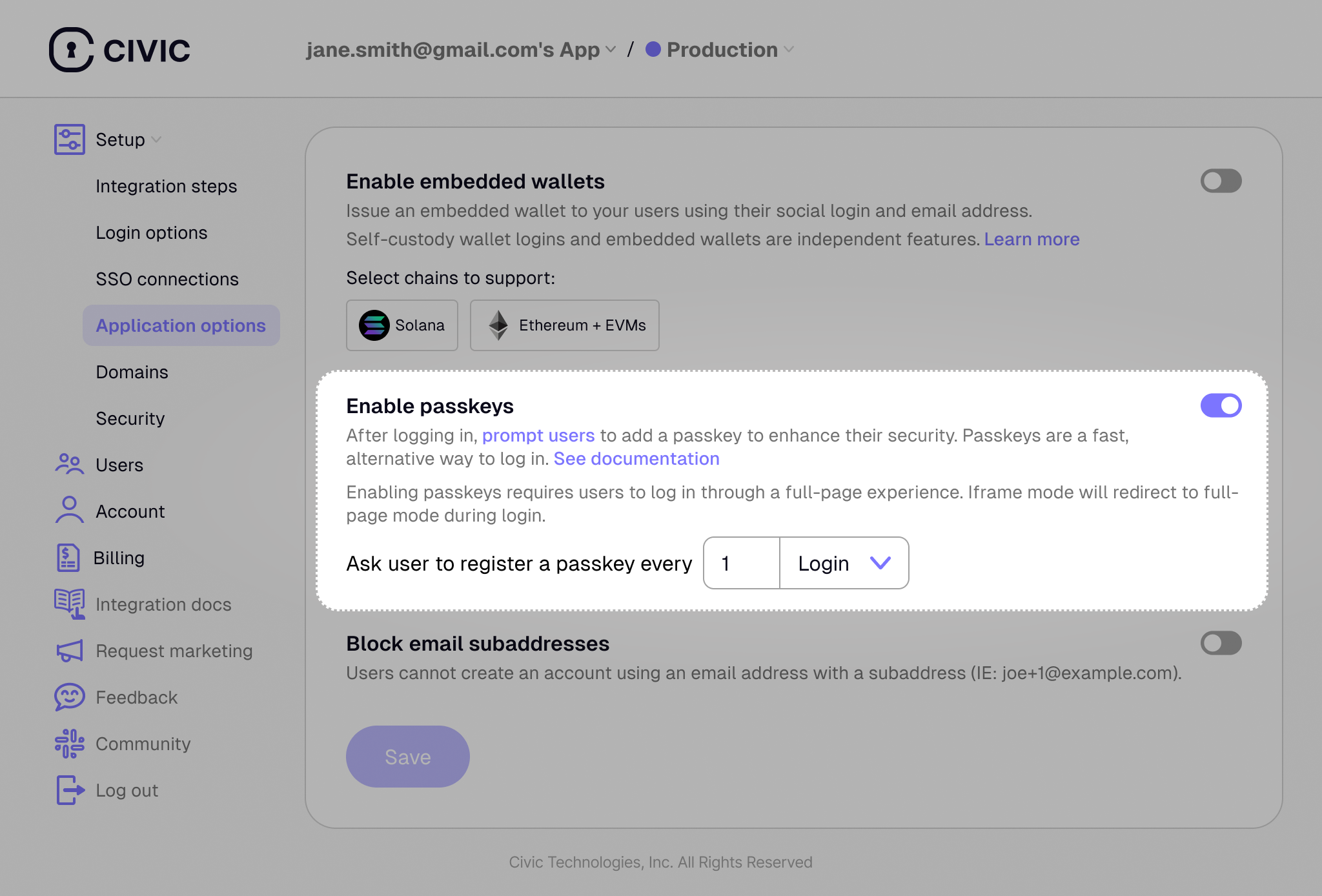
1. Navigate to your [Civic Auth Dashboard](https://auth.civic.com/dashboard)
2. Go to **Application Options** in the sidebar
3. Find the **Enable passkeys** section
4. Toggle the passkey setting to **ON**
5. Configure when users should be prompted to create passkeys
 ### Prompt Frequency Options
You can also decide how often you'd like your users to be prompted to create a passkey, based either on the number of logins or the time since their last login.
## What are Passkeys?
Instead of typing a password, users authenticate through simple, secure actions such as:
* A biometric scan (fingerprint, Face ID) or device PIN
* Tapping a physical security key (e.g., YubiKey)
* Authenticating via a password manager (e.g., Bitwarden)
## Authentication Flow
Passkeys provide **inherent multi-factor authentication (MFA)** by combining multiple authentication factors in a single step:
* **Something you have**: The device storing the passkey
* **Something you are/know**: Biometric verification (fingerprint/face) or device PIN
Users can:
* Use passkeys to bypass email/social login steps for faster access
* Always fall back to traditional login methods
* Continue using their preferred primary authentication method if they don't have their passkey
This flexibility ensures users never get locked out while providing enhanced security through built-in MFA.
## Key Benefits
* **Enhanced Security**: Built on the WebAuthn standard, passkeys are strongly resistant to phishing and server-side data breaches
* **Effortless Experience**: No need to create, remember, or type complex passwords
* **Cross-Device Syncing**: Passkeys sync across devices through platform accounts (Apple ID, Google Account)
* **Faster Logins**: Quick authentication without typing credentials
* **Built-in MFA**: Inherent multi-factor authentication without additional steps
## User Experience
When passkeys are enabled, here's what your users will experience:
1. **First-time setup**: After logging in with email or social login, users will be prompted to create a passkey for faster future access
2. **Subsequent logins**: Users can choose to authenticate with their passkey for instant access
3. **Fallback options**: Users can always skip passkey authentication and use traditional login methods instead
### Prompt Frequency Options
You can also decide how often you'd like your users to be prompted to create a passkey, based either on the number of logins or the time since their last login.
## What are Passkeys?
Instead of typing a password, users authenticate through simple, secure actions such as:
* A biometric scan (fingerprint, Face ID) or device PIN
* Tapping a physical security key (e.g., YubiKey)
* Authenticating via a password manager (e.g., Bitwarden)
## Authentication Flow
Passkeys provide **inherent multi-factor authentication (MFA)** by combining multiple authentication factors in a single step:
* **Something you have**: The device storing the passkey
* **Something you are/know**: Biometric verification (fingerprint/face) or device PIN
Users can:
* Use passkeys to bypass email/social login steps for faster access
* Always fall back to traditional login methods
* Continue using their preferred primary authentication method if they don't have their passkey
This flexibility ensures users never get locked out while providing enhanced security through built-in MFA.
## Key Benefits
* **Enhanced Security**: Built on the WebAuthn standard, passkeys are strongly resistant to phishing and server-side data breaches
* **Effortless Experience**: No need to create, remember, or type complex passwords
* **Cross-Device Syncing**: Passkeys sync across devices through platform accounts (Apple ID, Google Account)
* **Faster Logins**: Quick authentication without typing credentials
* **Built-in MFA**: Inherent multi-factor authentication without additional steps
## User Experience
When passkeys are enabled, here's what your users will experience:
1. **First-time setup**: After logging in with email or social login, users will be prompted to create a passkey for faster future access
2. **Subsequent logins**: Users can choose to authenticate with their passkey for instant access
3. **Fallback options**: Users can always skip passkey authentication and use traditional login methods instead
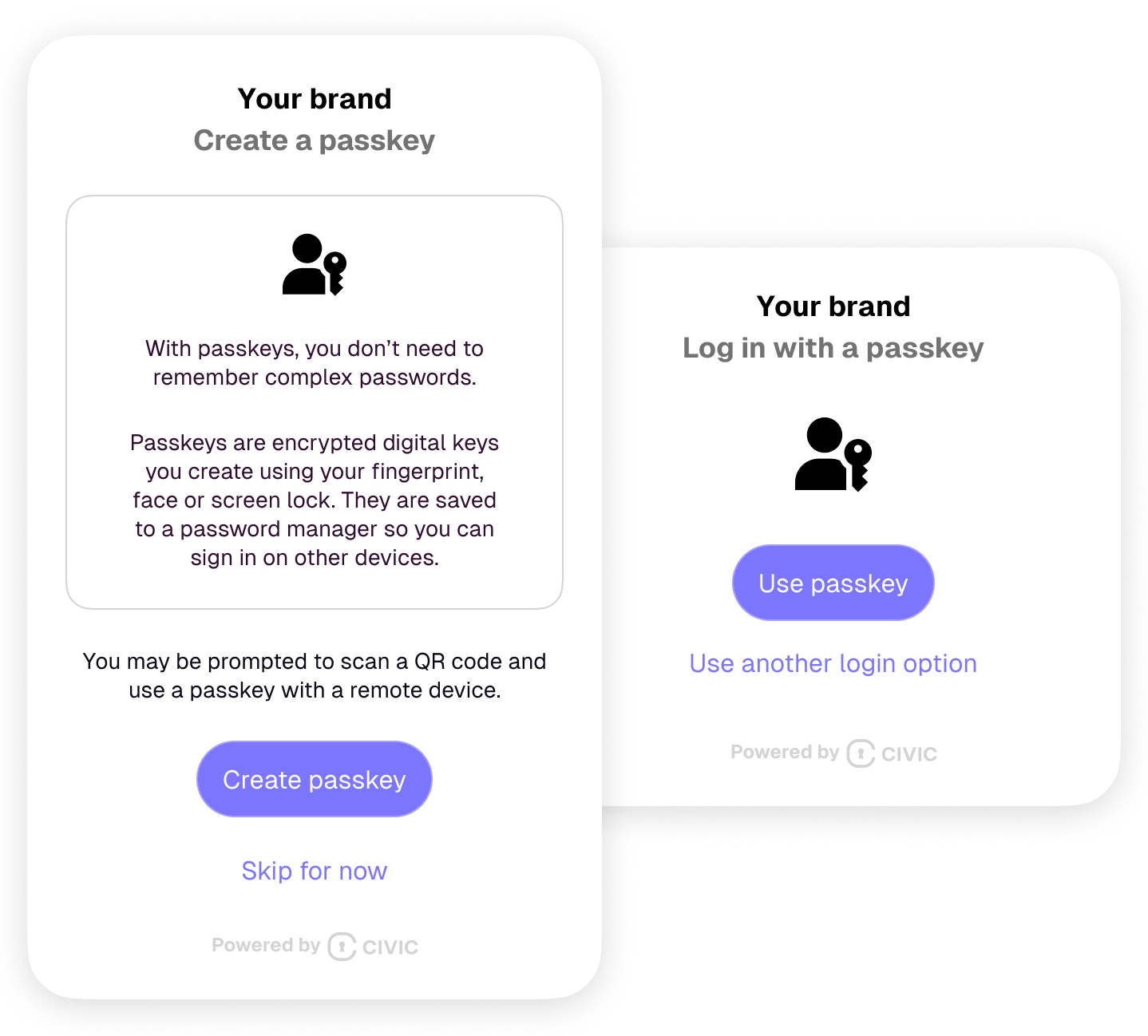 Due to browser iframe security restrictions, passkey authentication requires users to go through the full-page authentication flow rather than authenticating within an iframe.
## Browser Compatibility
For current browser support and compatibility matrices:
* **[WebAuthn API Browser Compatibility](https://caniuse.com/webauthn)** - Live compatibility data for WebAuthn support
* **[Passkeys.dev Device Support](https://passkeys.dev/device-support/)** - Detailed passkey support by platform and browser
* **[FIDO Alliance Certified Products](https://fidoalliance.org/certification/fido-certified-products/)** - List of certified authenticators
### Key Compatibility Resources
* **[MDN WebAuthn API Documentation](https://developer.mozilla.org/en-US/docs/Web/API/Web_Authentication_API)** - Comprehensive API reference with browser notes
* **[WebAuthn.io](https://webauthn.io/)** - Interactive demo to test passkey support in your current browser
* **[Passkeys.dev](https://passkeys.dev/)** - Developer resources and implementation guides
### Important Implementation Notes
**Cross-platform syncing:**
* Apple passkeys sync via iCloud Keychain (Apple ecosystem only)
* Google passkeys sync via Google Password Manager (Chrome/Android)
* Windows Hello passkeys are typically device-bound
**No additional code changes are required** in your application - Civic Auth handles all the passkey implementation automatically, including:
* WebAuthn credential creation and verification
* Cross-platform compatibility
* Fallback handling
* Error management
Your application continues to receive the same user authentication tokens regardless of whether the user logged in with a passkey or traditional method.
Due to browser iframe security restrictions, passkey authentication requires users to go through the full-page authentication flow rather than authenticating within an iframe.
## Browser Compatibility
For current browser support and compatibility matrices:
* **[WebAuthn API Browser Compatibility](https://caniuse.com/webauthn)** - Live compatibility data for WebAuthn support
* **[Passkeys.dev Device Support](https://passkeys.dev/device-support/)** - Detailed passkey support by platform and browser
* **[FIDO Alliance Certified Products](https://fidoalliance.org/certification/fido-certified-products/)** - List of certified authenticators
### Key Compatibility Resources
* **[MDN WebAuthn API Documentation](https://developer.mozilla.org/en-US/docs/Web/API/Web_Authentication_API)** - Comprehensive API reference with browser notes
* **[WebAuthn.io](https://webauthn.io/)** - Interactive demo to test passkey support in your current browser
* **[Passkeys.dev](https://passkeys.dev/)** - Developer resources and implementation guides
### Important Implementation Notes
**Cross-platform syncing:**
* Apple passkeys sync via iCloud Keychain (Apple ecosystem only)
* Google passkeys sync via Google Password Manager (Chrome/Android)
* Windows Hello passkeys are typically device-bound
**No additional code changes are required** in your application - Civic Auth handles all the passkey implementation automatically, including:
* WebAuthn credential creation and verification
* Cross-platform compatibility
* Fallback handling
* Error management
Your application continues to receive the same user authentication tokens regardless of whether the user logged in with a passkey or traditional method.