> ## Documentation Index
> Fetch the complete documentation index at: https://docs.civic.com/llms.txt
> Use this file to discover all available pages before exploring further.

# Solana

## Creating a Wallet

When a new user logs in, they do not yet have a Web3 wallet by default. You can create a wallet for them by calling the `createWallet` function on the user object.

<Info>
  Currently, we don't support connecting users' existing self-custodial wallets. This is coming soon.

  Right now, we only support embedded wallets, which are generated on behalf of the user by our non-custodial wallet partner. Neither Civic nor your app ever has access to the wallets' private keys.
</Info>

Here’s a basic example:

<Check>
  Complete examples can be found on Github:

  * Vite: [with Solana wallet adapter ](https://github.com/civicteam/civic-auth-examples/tree/main/packages/civic-auth-web3/solana/vite-wallet-adapter)and [without Solana wallet adapter](https://github.com/civicteam/civic-auth-examples/tree/main/packages/civic-auth-web3/solana/vite-no-wallet-adapter)
  * NextJS [with Solana wallet adapter](https://github.com/civicteam/civic-auth-examples/tree/main/packages/civic-auth-web3/solana/next15-wallet-adapter) and [without Solana wallet adapter](https://github.com/civicteam/civic-auth-examples/tree/main/packages/civic-auth-web3/solana/next15-no-wallet-adapter)
  * If you're using the Solana wallet adapter with NextJS \<15.3 and webpack, see [this example](https://github.com/civicteam/civic-auth-examples/tree/main/packages/civic-auth-web3/solana/next14-wallet-adapter)
</Check>

```tsx theme={null}
import { userHasWallet } from "@civic/auth-web3";
import { useUser } from "@civic/auth-web3/react";

export const afterLogin = async () => {
  const userContext = await useUser();

  if (userContext.user && !userHasWallet(userContext)) {
    await userContext.createWallet();
  }
};
```

## **The useUser hook and UserContext Object**

The useUser hook returns a user context object that provides access to the base library's [user object](/integration/react#user) in the 'user' field, and adds some Web3 specific fields. The returned object has different types depending on these cases:

If the user has a wallet,

```tsx theme={null}
type ExistingWeb3UserContext = UserContext & {
  solana: {
    address: string // the base58 public key of the embedded wallet
    wallet: Wallet // a Solana Wallet object
  }
}
```

The wallet object follows the interface used by [Solana's Wallet Adapter](https://www.npmjs.com/package/@solana/wallet-adapter-react).

If the user does not yet have a wallet:

```tsx theme={null}
type NewWeb3UserContext = UserContext & {
  createWallet: () => Promise<void>;
  walletCreationInProgress: boolean;
}
```

An easy way to distinguish between the two is to use the `userHasWallet` type guard.

```tsx theme={null}
if (userHasWallet(userContext)) {
  user.solana.wallet; // user has a wallet
} else {
  user.createWallet();// user does not have a wallet
}
```

## Using the Wallet

### Sending a transaction

```tsx theme={null}
const connection = new Connection(/* your rpc endpoint */);
const { publicKey, sendTransaction } = user.solana.wallet;

const transaction = new Transaction().add(
  SystemProgram.transfer({
    fromPubkey: publicKey,
    toPubkey: new PublicKey(recipient),
    lamports: 1000000,
  })
);
const signature = await sendTransaction(transaction, connection);
```

### Checking the balance

```tsx theme={null}
const connection = new Connection(/* your rpc endpoint */);
const { publicKey } = user.solana.wallet;
const balance = await connection.getBalance(publicKey);
```

### Signing a message

```tsx theme={null}
const { signMessage } = user.solana.wallet;

// The message to sign
const message = "Hello, World!";

// Convert message to bytes
const messageBytes = new TextEncoder().encode(message);

// Sign the message
const signature = await signMessage(messageBytes);
```

## Using the Wallet with the Solana Wallet Adapter

The Civic Auth Web3 SDK uses the [Solana Wallet Adapter](https://www.npmjs.com/package/@solana/wallet-adapter-react) to expose the embedded wallet to React frontends. This allows you to use familiar hooks such as `useWallet` and `useConnection` to interact with the wallet.

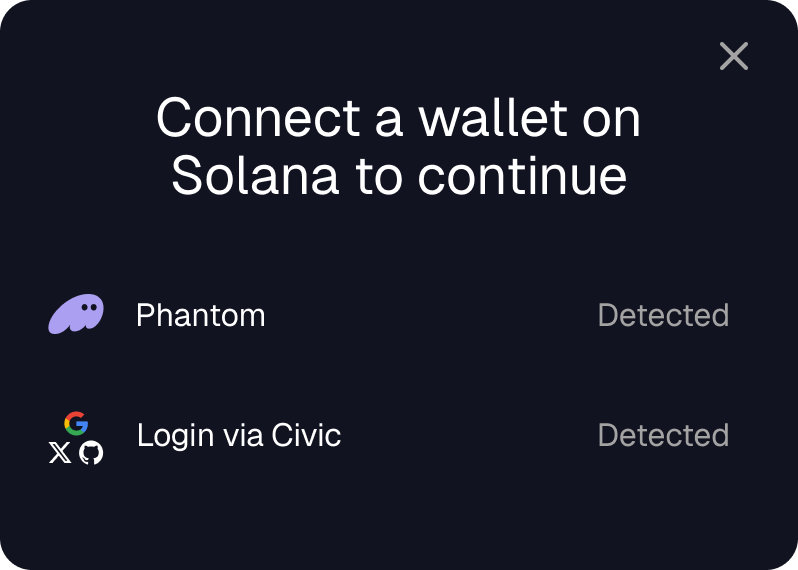
This means that Civic will be available as a choice for your users to connect when using `@solana/wallet-adapter-react`:

<Frame>
  <img src="https://mintcdn.com/civic/O4L8MDyrwt6gcvaS/images/connect-wallet.png?fit=max&auto=format&n=O4L8MDyrwt6gcvaS&q=85&s=d5eec0b4f5c5c39cbc2bb893fc8b687c" alt="Solana Wallet Adapter" className="width: 75%; display: block; margin: 0 auto;" title="" width="798" height="570" data-path="images/connect-wallet.png" />
</Frame>

In the example above, the user has Phantom installed and can connect their existing Phantom wallets to your dApp via the wallet-adapter. These wallets cannot currently be linked to Civic Auth. When the user selects Civic Auth, they are taken through a social login flow which gives them an embedded wallet generated by our backend, which is then exposed to your dApp via the wallet-adapter interface.

The Civic embedded wallets cannot be connected at the same time as the user's existing wallets.

<Info>
  **Use with Webpack in NextJS**

  When using the Solana Wallet Adapter with Webpack (default in NextJS \<15.3), add the following flag in your next.config.ts or next.config.mjs file, passed into the createCIvicAuthPlugin function:

  ```
  createCivicAuthPlugin({
    clientId: '<your civic auth client ID>',
    // ensures Civic's Wallet Adapter integration works with Webpack:
    enableSolanaWalletAdapter: true,
  });
  ```
</Info>

Make sure to follow the steps described [here](https://solana.com/developers/cookbook/wallets/connect-wallet-react) (React) and [here](https://solana.com/developers/guides/wallets/add-solana-wallet-adapter-to-nextjs) (Next.Js) to get started with the Solana Wallet Adapter.

The Civic Auth Web3 SDK follows the [wallet standard](https://github.com/wallet-standard/wallet-standard?tab=readme-ov-file), meaning that the Solana Wallet Adapter will automatically discover the embedded wallet.

Set up the Solana Wallet Adapter as shown below:

```tsx theme={null}
export const Providers: FC = () => {
    const endpoint = "YOUR RPC ENDPOINT";
    return (
        <ConnectionProvider endpoint={endpoint}>
            <WalletProvider wallets={[]} autoConnect>
                <WalletModalProvider>
                    <CivicAuthProvider clientId="YOUR CLIENT ID">
                        <WalletMultiButton />
                        { /* Your app's components go here */ }
                    </CivicAuthProvider>
                </WalletModalProvider>
            </WalletProvider>
        </ConnectionProvider>
    );
};
```

<Info>
  The above shows a minimal React example. Follow the integration [steps](/integration/react) to set up the CivicAuthProvider according to your framework.
</Info>

### A Full Example

See below for a full minimal example of a Solana Adapter app using Civic Auth for an embedded wallet.

```tsx theme={null}
import { ConnectionProvider, WalletProvider, useWallet, useConnection } from "@solana/wallet-adapter-react";
import { WalletModalProvider} from "@solana/wallet-adapter-react-ui";
import { CivicAuthProvider } from "@civic/auth-web3/react";

// Wrap the content with the necessary providers to give access to hooks: solana wallet adapter & civic auth provider
const App = () => {
    const endpoint = "YOUR RPC ENDPOINT";
    return (
        <ConnectionProvider endpoint={endpoint}>
            <WalletProvider wallets={[]} autoConnect>
                <WalletModalProvider>
                    <CivicAuthProvider clientId="YOUR CLIENT ID">
                      <WalletMultiButton />
                      <AppContent/>
                    </CivicAuthProvider>
                </WalletModalProvider>
            </WalletProvider>
        </ConnectionProvider>
    );
};

// A simple hook to get the wallet's balance in lamports
const useBalance = () => {
  const [balance, setBalance] = useState<number>();
  // The Solana Wallet Adapter hooks
  const { connection } = useConnection();
  const { publicKey } = useWallet();

  if (publicKey) {
    connection.getBalance(publicKey).then(setBalance);
  }

  return balance;
};

// Separate component for the app content that needs access to hooks
const AppContent = () => {
  // Get the Solana wallet balance
  const balance = useBalance();
  // Get the Solana address
  const { publicKey } = useWallet();

  return (
    <>
      {publicKey && (
        <div>
          <p>Wallet address: {publicKey.toString()}</p>
          <p>Balance: {balance ? `${balance / 1e9} SOL` : "Loading..."}</p>
        </div>
      )}
    </>
  );
};

export default App;
```
