

Claude Code supports direct HTTP Streaming connections to Civic — no local bridge required. Follow the steps below to connect in a few minutes. Hub Bridge is also available as a fallback if needed.
Overview
Claude Code (Anthropic’s command-line coding assistant) uses Model Context Protocol (MCP) to talk to external tools. Claude Code supports direct HTTP connections to Civic — no local bridge required.Prerequisites
- Anthropic Claude CLI (
claude) installed and authenticated - A Civic account — create one free at app.civic.com
How authentication worksCivic supports two methods depending on how your client connects:
See Get Your Credentials for full details.
Quick Setup
Claude Code supports two connection methods. Choose the one that works best for you:- HTTP Transport (Recommended)
- Hub Bridge (Alternative)
Direct Connection via HTTP
Claude Code now supports direct HTTP connections to Civic without needing a local bridge.1
Register the Civic server with HTTP transport
Run this command to add Civic via HTTP:This configures Claude Code to connect directly to Civic over HTTP.
2
Launch Claude Code
Start the Claude CLI session:Tip: add the
--debug flag if you want to watch MCP logs while connecting.3
Connect and sign in
Inside the Claude session, run the MCP menu command:Select the
civic server. A browser window opens to app.civic.com — sign in with your Civic account. Once complete, Claude confirms the server is connected and ready to use.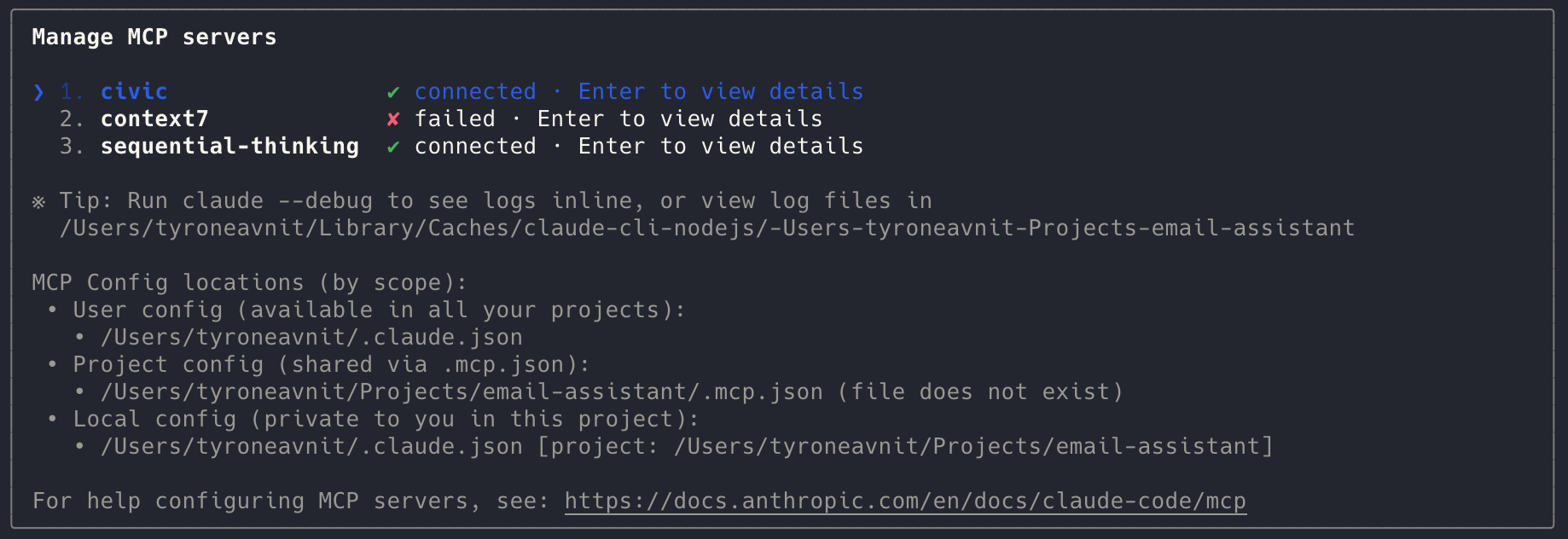
Verify the Connection
- In Claude, run
/mcpagain to check thatcivicshows asconnected - Test a Civic command (for example, request a tool list) to confirm the session is authorized
Troubleshooting
- If the connection shows
failed, re-runclaude --debugto view detailed logs in your terminal - Ensure you have an active Civic session in your default browser; the MCP flow opens a new window for login
- Delete and re-add the server with
claude mcp remove civicfollowed by the setup command if you need to refresh credentials
Resources
Hub Bridge Guide
Full Hub Bridge configuration details
Client Compatibility
MCP support matrix for Claude Code
Troubleshooting
Common Claude Code connection fixes
Installing into an agent
Deploy Civic in autonomous agents and automation platforms